![lutronic-red-tab-white.png]](https://support.lutronic.com/hs-fs/hubfs/Branding/lutronic-red-tab-white.png?height=50&name=lutronic-red-tab-white.png)
HubSpot CRM
Manually add Contacts
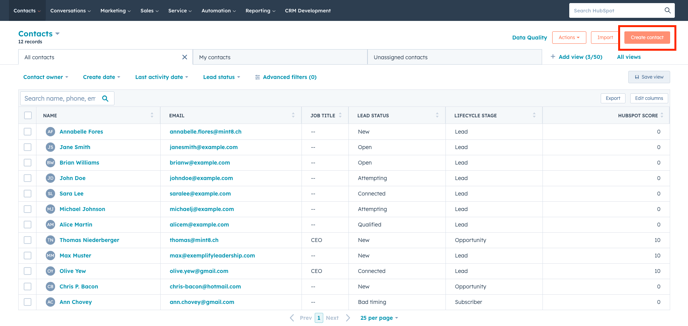
Navigate to contacts and on the top right, click on "Create Contact".
A slide-in pop-up will appear on your right-hand side. The content may be different depending on the installation or your team. Add as much information as you have and consider these tips:
- Ensure that you do not mix-up mobile and landline numbers
- Adding country name as given in the list
- Always opt for the languages without the country-add on.
- Add the Legal basis why you add the customer.
- Mark the contacts as a marketing contact, in order to be able to send mails. A Marketing contact is a contact that we pay for. It is also possible to set certain contacts in a later stage as a Marketing contacts.
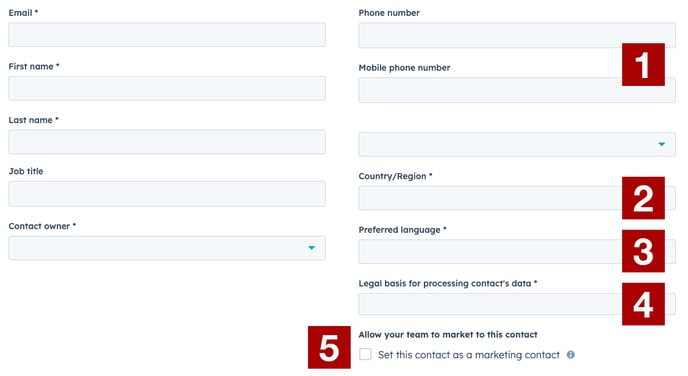
Add as much Information as you have from a customer and company. The more Information, you're able to collect from a customer the better. Always consider GDPR.
Marketing Contacts
HubSpot's Marketing Contacts feature lets you segment your contact database into marketing and non-marketing contacts. You only pay for marketing contacts you engage with through HubSpot’s marketing tools, while non-marketing contacts, who you may interact with using sales or service tools, come at no additional cost.